¶ SELinux
Security Enhanced Linux
¶ Modes
Three modes:
- Enforcing: SELinux enforces the security polices on an entire system. Enforcing is the default and recommended mode in RHEL.
- Permissive: SELinux loads the polices and is active, however it only logs violations of the defined policies and does not prevent transgressions.
- Disabled: SELinux is turned off, violations are not logged nor prevented. Labelling of file system with secuirty contexts is avoided. This can make turning SELinux on in the future more challenging. Fully disabling SELinux is discouraged.
¶ Checking and setting modes
To check which mode SELinux is currently in, run getenforce.
To change which mode SELinus is operating in, use setenforce [ Enforcing | Permissive | 1 | 0 ], e.g to set to permissive mode run setenforce 1.
SELinux modes can also be specified at boot time using kernel parameters:
enforcing=0= boots in to permissive modeenforcing=1= boots in to enforcing mode
It can also be enabled/disabled at boot time with kernel parameters:
selinux=0= disabledselinux=1= enabled
¶ Config file
Config file can be found at /etc/selinux/config
¶ SELinux Labels
SELinux labels have the following form:
| USER:ROLE:TYPE:LEVEL:FILE |
Example:
| unconfirmed_u:object_r:httpd_sys_content_t:s0:/var/www/html/file2 |
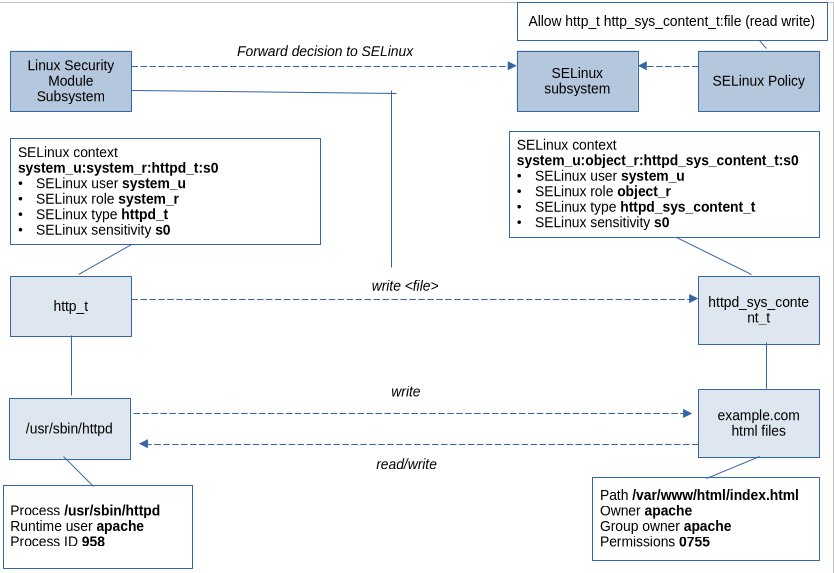
There are several commands which are able to show SELinux contexts and labelling. Some of these are: ps, ls, cp, and mkdir. The SELinux labelling can be added using the -Z option on each of these commands.
¶ Context
All resources including processes, files, and ports and labelled with an SELinux context. A file-based database is maintained containing all the file labelling policies. This resides at /etc/selinux/targeted/context/files. New files are given a default label when their name matches an existing labelling policy.
When a file does not match an existing policy, the file inherits the label of the parent directory. When copying a file from one location to another, this can cause the file context label to change. All file attributes can be preserved using the -p option with the cp command. If wishing to preserve only the SELinux attributes, then --preserve=context option can be employed.
Example of checking SELinux context using ls:
root@host:~# ls -Z /var/www/html/file*
unconfined_u:object_r:user_tmp_t:s0 /var/www/html/file1
unconfined_u:object_r:httpd_sys_content_t:s0 /var/www/html/file2
Context can be managed using the following commands:
semanage fcontextrestoreconchcon
It is recommended that the semanage fcontext command is used in order to create a file context policy and then to apply the specified policy using the restorecon command. This means that it is not necessary to recall all of the contexts when applying policies and policy can be applied to a set of files.
The chcon command changes the SELinux context directly on files without referencing SELinux policy. This is useful for testing and debugging; however doing this manually is a temporary measure (though it will probably survive reboots) and will last until the next time restorecon is executed.
Example follows:
root@host:~# mkdir /virtual
root@host:~# ls -Zd /virtual
unconfined_u:object_r:default_t:s0 /virtual
root@host:~# chcon -t httpd_sys_content_t /virtual
root@host:~# ls -Zd /virtual
unconfined_u:object_r:httpd_sys_content_t:s0 /virtual
root@host:~# restorecon -v /virtual
Relabeled /virtual from unconfined_u:object_r:httpd_sys_content_t:s0 to unconfined_u:object_r:default_t:s0
root@host:~# ls -Zd /virtual
unconfined_u:object_r:default_t:s0 /virtual
We first make a directory called /virtual and we can check the context using ls -Zd /virtual (output line 3).
Next we use chcon to set the context to httpd_sys_content_t and verify this by once again running ls -Zd /virtual. We can see on line 6 that the context has indeed been updated.
Now we run restorecon -v /virtual (-v for verbose output to verify what is being updated/restored). Lastly, we run ls -Zd /virtual and we can see that the context has been reverted back to the original setting.
To display and modify the SELinux policies which determine the default file contexts, we can run semanage fcontext -l. This will list out all the RegEx based rules to specify path and file names. The most command RegEx seen here is (/.*)? and is usually appended to a directory name.
There are a few options to be aware of:
| Option | Explanation |
|---|---|
-a, --add |
Add a record of the specified object type. |
-d, --delete |
Delete a record of the specified object type. |
-l, --list |
List records of the specified object type. |
Example of setting context for httpd (Apache):
semanage fcontext -a -t httpd_sys_content_t '/virtual(/.*)?restorecon -RFvv /virtual
We can also check local customisations to the default policy by running semanage fcontext -l -C